

Home Services Marketing Built on a Knowledgebase, Not a Keyword List
Your HVAC company has installed thousands of systems. Your plumbing team has pulled every type of water heater. Your crew has cleared storm damage across three counties. Is all of this expertise showing up on your website and are people finding it in AI Overviews in Gemini, Google, ChatGPT, Perplexity and Claude? In this blog we will break down how we are using frontier apps like Notion, models like Fable 5, and other tools to tackle AEO and GEO for our clients.
Most home services companies publish blog posts written from a keyword list, not from their actual experience. The result is generic content that ranks on page three and converts nobody. Meanwhile, the contractors who structure their service data and turn it into content are the ones showing up in Google’s AI answers, grabbing leads, and building trust before the first phone call.
Here is how we build client knowledgebases that turn real operational data into content that actually ranks. It is the same approach behind our own numbers: Hughes Media has increased one client’s leads by 600%, grows annual website traffic by 20-40% for every client, and drove a 77% year-over-year traffic increase for an HVAC company with zero paid traffic.
For owners comparing home services digital marketing partners, the point is not to publish more generic blogs. The point is to build a source of truth that improves every page, from service-area content to the complete home services marketing strategy. It is also the foundation of effective SEO for contractors, because search engines reward content built on real expertise.
What a Client Knowledgebase Actually Looks Like
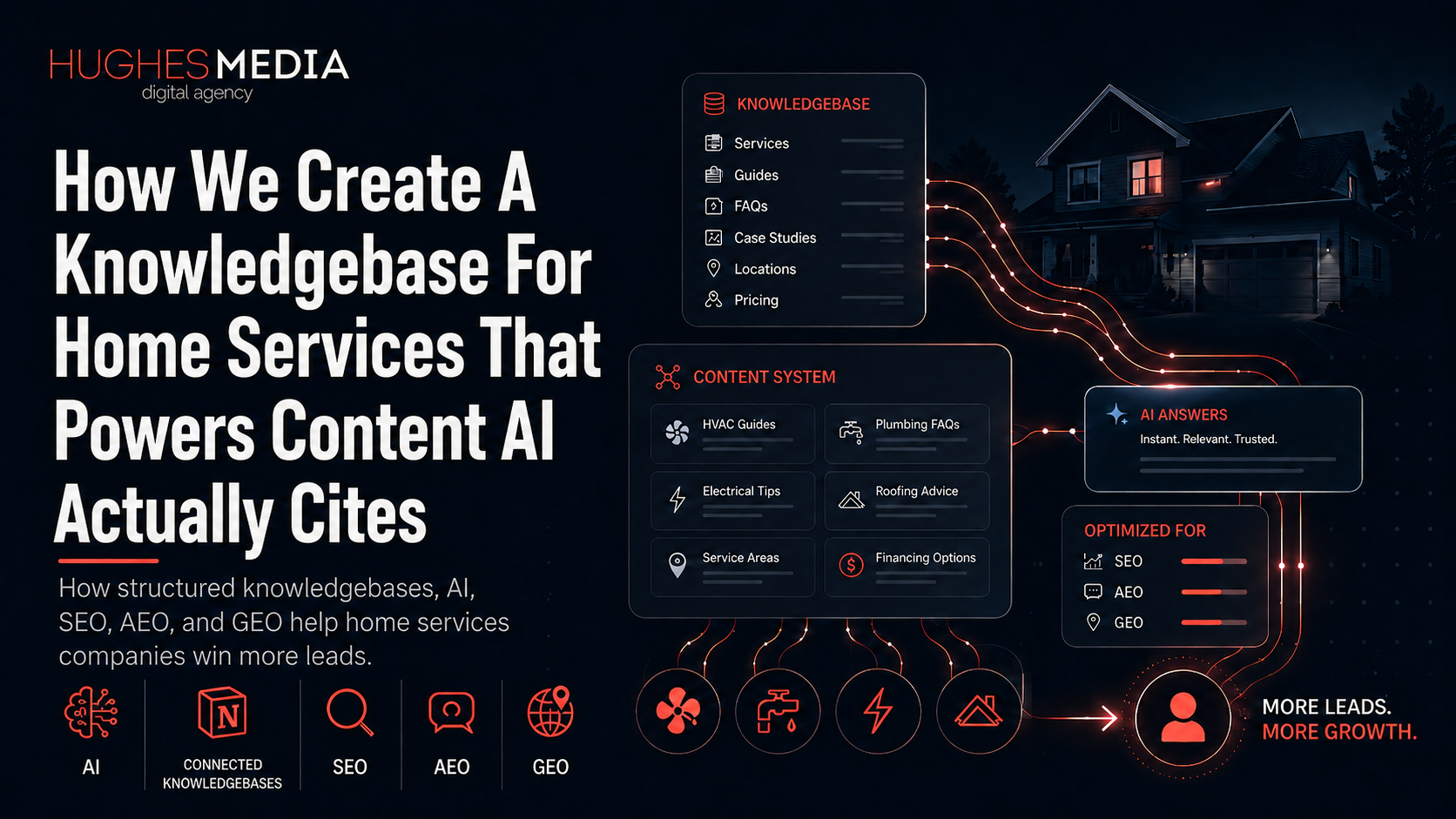
A knowledgebase is not a filing cabinet. It is a set of connected databases built in Notion that capture what your business knows and turn it into a working content operation.
For every client, the build includes:
- A client hub with your real business data. Your services and capabilities, service areas, pricing ranges, team credentials, project details, testimonials, and the questions your dispatchers and techs answer every day. This is the reference layer every draft gets checked against.
- A research and topic layer. Customer questions, competitor gaps, and content angles organized into topic clusters, so every piece of content is part of a strategy instead of a one-off blog post or page.
- A keyword database. One row per target keyword, tagged by category, priority, and search intent, and linked to the topic cluster it supports and the page or post that targets it. Not a spreadsheet that gets exported once and forgotten. It gets layered into all content.
- A content pipeline. Every blog and page build moves through statuses from idea to published, with writers, sprints, due dates, and target keywords attached. You can see exactly what is in flight at any time.
- A final content library. Published pieces stored with their schema pages, live URLs, and publish dates, so every asset can be tracked, updated, and repurposed instead of forgotten.
- Templates, meeting notes, and reporting in the same system. Custom blog, schema, and reporting templates keep every deliverable consistent. Client calls and meeting notes land next to the content pipeline, where they become source material instead of lost files.
With frontier AI models powering Notion, everything stays linked together and is instantly searchable. That is what sets this method apart. Keywords connect to topic clusters, clusters connect to drafts, and drafts connect to published content. That connected structure is what makes it a knowledgebase, and it becomes the single source of truth for your content, web pages, and marketing materials.
How the Data Becomes Content
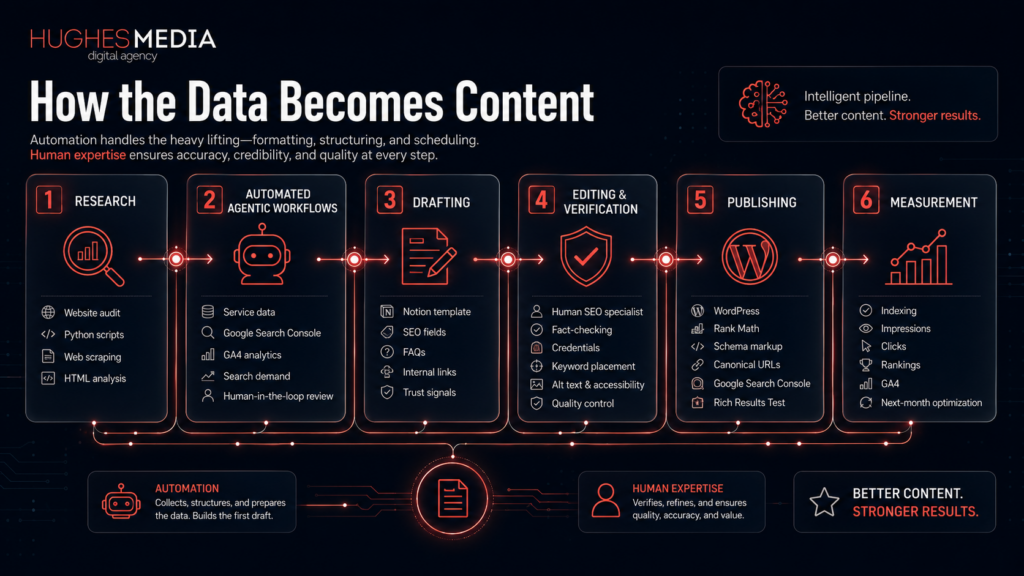
Here is the pipeline. It is not complicated, but it requires structure. Automation handles the formatting, the scheduling, and the schema generation. Human oversight handles the verification, the editing, and the quality control. The point is not to remove people from the process. It is to remove the parts of the process that waste their time.
Research. Before anything finds its way into Notion, we conduct a full audit of the entire website. With our ability to write python scripts with web scraping APIs, we get the full picture, down to every nook and cranny of your websites HTML. No stone gets left unturned.
Automated Agentic Workflows. From there, we itemize the priorities and we start structuring your company data. This isn’t just keyword research and ranking them by keyword volume, this is a full agentic workflow and pipeline with a “Human-In-The-Loop” pouring over the data coming in. The service data, Google Search Console Data, GA4 analytics, and your company history tell us what to write about. We cross-reference that against search demand to prioritize topics that match real queries with real expertise, and your web pages match real intent and queries.
Drafting. Every draft is written inside Notion on a custom blog template refined across our client sites, not in a blank document. The template locks in what actually ranks: SEO elements (focus keyphrase, meta title, meta description, slug) set before the first paragraph is written, trust and credentials, comparison tables, FAQs pulled from real customer questions, and internal links to your service and location pages. The client hub feeds the substance. When a post covers emergency furnace repair, the draft pulls from actual service records, real customer questions, and verified pricing data, so it reads accurately and has the marketing information LLMs covet when someone asks, “I have a leak in my kitchen pipes, what do I do?”
Editing and verification. A human SEO specialist reviews every draft before it moves forward. Every claim is checked against your real business data: service areas, pricing ranges, licensing, and certifications. Then the SEO layer is verified line by line, from keyword placement in the headline and headers to meta title and description lengths, descriptive anchor text, and image alt text. Images are also optimized to load quickly. This step catches the generic statements, lowers bounce rates, and assumptions that make most marketing content feel hollow. Also, nothing goes live until you have reviewed and approved it.
Publishing. Approved content goes into WordPress with the full technical treatment. SEO fields filled in RankMath, compressed and renamed images with alt text, correct canonical URLs, and schema written for the specific post, including Article, FAQ, and Local Business markup. In practice, this is structured data for AEO (answer engine optimization): machine-readable facts that answer engines need before they will cite your business. Every URL is submitted to Google Search Console the day it goes live, and every schema block is validated with Google’s Rich Results Test. This is what helps you show up in AI Overviews and local search results, not just traditional blue links. Even though FAQs have been eliminated from search, LLMs still use this information and people find it helpful as well.
Measurement. Publishing is not the finish line. We verify indexing in Google Search Console within 72 hours, monitor impressions and clicks, track keyword positions in SE Ranking, and review traffic and engagement in GA4. What the data shows feeds directly into the next month’s content priorities.
Why Notion, Not Google Drive
Most businesses already store files in Google Drive, and we still use Google Drive. It works fine for sharing documents and storing as a hard drive. But a folder of PDFs and Google Docs is not a knowledgebase, it becomes a file amongst many other files. Even with Google’s recent Gemini updates, helping to connect Google Sheets, Docs, and Gmail, it is not quite the same as a living and breathing agentic-first database. Google Drive is a filing cabinet that lives in the cloud. Notion is AI with hands and a brain.
The difference comes down to how the system thinks about your data.
Notion is searchable end-to-end. In Google Drive, you search by file name and hope you named things well. In Notion, you search by content. Every service detail, every customer question, every project note is indexed and findable. A search for “tankless water heater” pulls up the service description, the pricing data, the customer questions about it, and the project photos, and it happens all at once. With powerful AI models like Anthropic’s Sonnet 5 and Fable 5, and OpenAI’s GPT 5.5, they have the agentic ability to search beyond the capabilities of Google Drive.
Notion can read everything at once. These models have a staggering 1 million token context window. In other words, they can hold the entire Harry Potter series (and then some) in their “brain” in one pass. Along with Notion AI ability to process 90+ pages in one search, interlinking, searching, and creating content has transformed into a true automated agentic workflow. In plain English, because we are building quality data in Notion, your content is able to reflect that, as well.
Think of it like an HVAC setup. Notion AI with Fable 5 is central HVAC for your business data: one brain conditioning every room from a single system. Google Drive is a house full of window units, each one working alone with no idea what the others are doing, with no idea what the other window unit is doing.
Where Google Drive Falls Short. Even with Gemini connecting things better than it has before, Google Drive is no where near as capable and organized as Notion AI with a brain of Fable 5 powering it. When you ask Drive to find something across your files, it checks titles and metadata. When you ask Notion, it actually reads the content and connects dots across your entire workspace.
Notion knows where to look. The structure of a Notion workspace, such as databases or spreadsheets, interlinked pages, and tagged entries, means the system understands what each piece of information is and where it belongs. It understands context, not just that it exists as a file or spreadsheet. This is where the audit data from earlier comes to life. The HTML findings from your website audit, the Google Search Console queries, the GA4 numbers, and the keyword research all land in the system as tagged, connected entries. An audit finding links to the keyword it uncovered, the keyword links to the page that targets it, and the meeting note where you explained a service links to the draft that uses it. You do not have to tell it where to search. It already knows.
Meeting notes become content. AI recordings in Fireflies or Gemini is great to reference from client calls, project debriefs, or strategy meetings. However, in Notion, those notes are now inside the same system as your content pipeline. Your call with our Account Manager becomes a source, not a reference file lost in a list of all your other meetings. When you mention on a strategy call that slab leak repair questions are spiking in Marietta, that note lands in your hub and our writers pull from it for the next blog post or service page update. No copying, no downloading, no pasting into a different app. Your expertise goes from a conversation to published content, and the data stays in one place the whole way.
This is why we build knowledgebases in Notion and not in file storage. A filing cabinet stores things, while a connected knowledge system with frontier AI models helps connect them.
Good Data In, Good Data Out
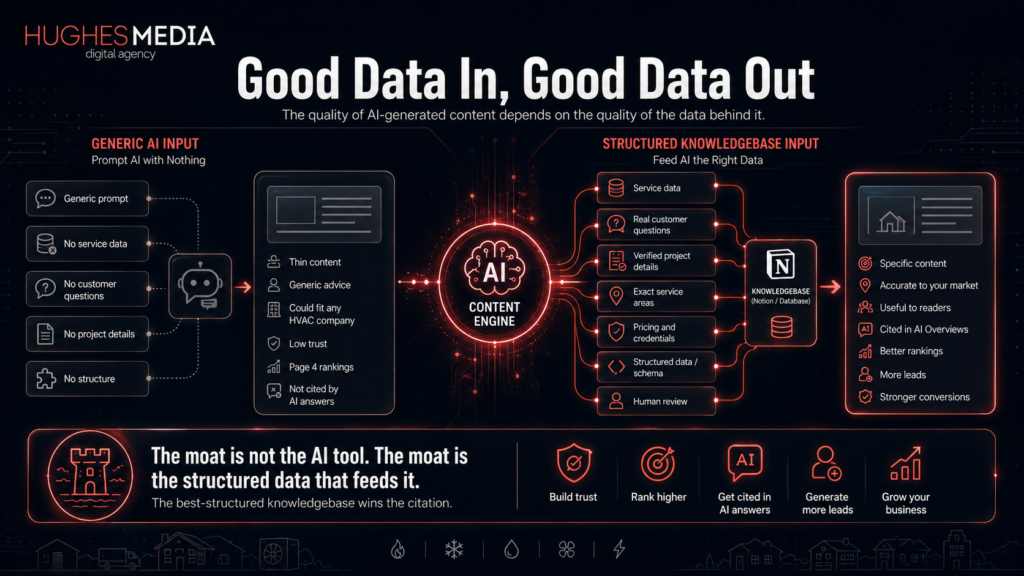
Every home services marketing agency has access to the same AI writing tools. Every agency (and you as well) can prompt ChatGPT to write a blog post about furnace maintenance. Without a structured source of truth, we know that content will be thin, misaligned, and leave out all of that structured data LLMs look for when searching which content to pull up in an AI answer or which service to recommend. The difference is what you feed the tool.
Prompt an AI with nothing, and you get a generic article that could apply to any HVAC company in any city. It will mention changing air filters and scheduling annual tune-ups. This is thin content, and if it even ranks and indexed by Google, it will rank on page four because fifty other companies published the same article the same week.
Now run that same prompt through a structured knowledgebase. When we draft in Notion, the AI is not guessing. It is pulling from your service data, real customer questions, verified project details, and exact service areas, and a human on our team checks every claim before anything ships. Then it goes live with the schema and structured data that answer engines read. The result is content that is specific to your business, accurate to your market, and useful to the person reading it. That is the content AI Overviews cite. That is the content that ranks. That is the content that converts a searcher into a caller.
The moat is not the AI tool. The moat is the structured data that feeds it. That is also the core of GEO for home services companies: generative engines pull answers from the sources with the most specific, verifiable data, so the business with the best-structured knowledgebase wins the citation.
What This Means for Choosing a Marketing Partner
Everything in this post comes down to one question you can ask any marketing agency for home services you are evaluating: where does your content come from? The answer tells you whether you are buying a system built on your expertise or a keyword list with a logo on it. The brands that win for home services companies are the ones that treat content as a product of expertise, not a product of keywords.
Green flags:
- They audit your website before they write anything, down to the HTML, and can show you what they found.
- They ask for your service data, customer questions, and project history, because that is what the content gets built from.
- They build a structured knowledgebase, not just a content calendar.
- Their content reads like your team wrote it, not like ChatGPT wrote a generic marketing blog.
- They have verifiable results with home services companies and report from the real data in Google Search Console, GA4, and rank tracking, explained in plain language.
Red flags:
- They start with a keyword list and nothing else.
- Their published blog posts could apply to any competitor in any market.
- They cannot explain how their content connects to your actual business operations.
- They pitch an “automated dashboard” that is really just Google’s APIs in a fancy wrapper: numbers you could pull yourself, with no analysis and no action behind them.
- They treat content as a volume game: more posts, more keywords, more pages. This is spam, and it will not rank, drive leads, or perform well.
- They automate everything without a “Human-In-The-Loop” verifying, making decisions, and editing content to ensure accuracy.
This Approach Works Beyond Home Services
The structured knowledgebase model is not limited to contractors and home services. Any business that has operational expertise, customer data, and service-specific knowledge can turn that into content that outperforms generic alternatives.
Medical practices, law firms, financial advisors, real estate agencies, and professional service companies all sit on years of client questions, case histories, and subject-matter expertise that never makes it into their marketing. The same principle applies: good data in, good data out.
We are building marketing guides for these verticals and will publish them as we expand. What we call AEO for home services becomes AEO for law firms or medical practices. The framework stays the same. Only the data changes.
Frequently Asked Questions
How much does this cost?
Nothing extra. The entire system is included in our marketing packages and is fully operational for every client we work with. It is not an add-on or an upsell, it is how we do the work. If you want a standalone Notion hub built for your own team to run, we offer that as well.
How long does it take to set up?
Quicker than you would think. The client hub template, the keyword and content pipeline databases, and our audit scripts are already built and battle-tested. Setup is mostly loading your data: we run the website audit, import the findings, and start filling the hub with your service data and history. From there it becomes a living system that your team and our team update as new services, questions, and projects come in.
Who owns the knowledge base?
You do. Your hub is yours, and everything in it can be exported. The service data, research, and content we build together stay with your business, the same way we believe you should own your website.
Hughes Media helps home services companies build structured content systems that generate leads. See our Complete Guide to Home Services Marketing or schedule a discovery call to talk about what this could look like for your business.
For more on how AI is reshaping search and what it means for local businesses, read our guide on how AI is changing search.
About the Author:

Jason Pollak
Jason Pollak is the SEO Lead for Hughes Media. He is a full-funnel marketing strategist with over 12 years of experience in SEO, paid media, and digital strategy. He has helped brands across local services, eCommerce, B2B, and SaaS grow their online presence and drive measurable revenue. His work spans local search optimization, paid campaigns, and conversion strategy.